01
Images, ready to go.
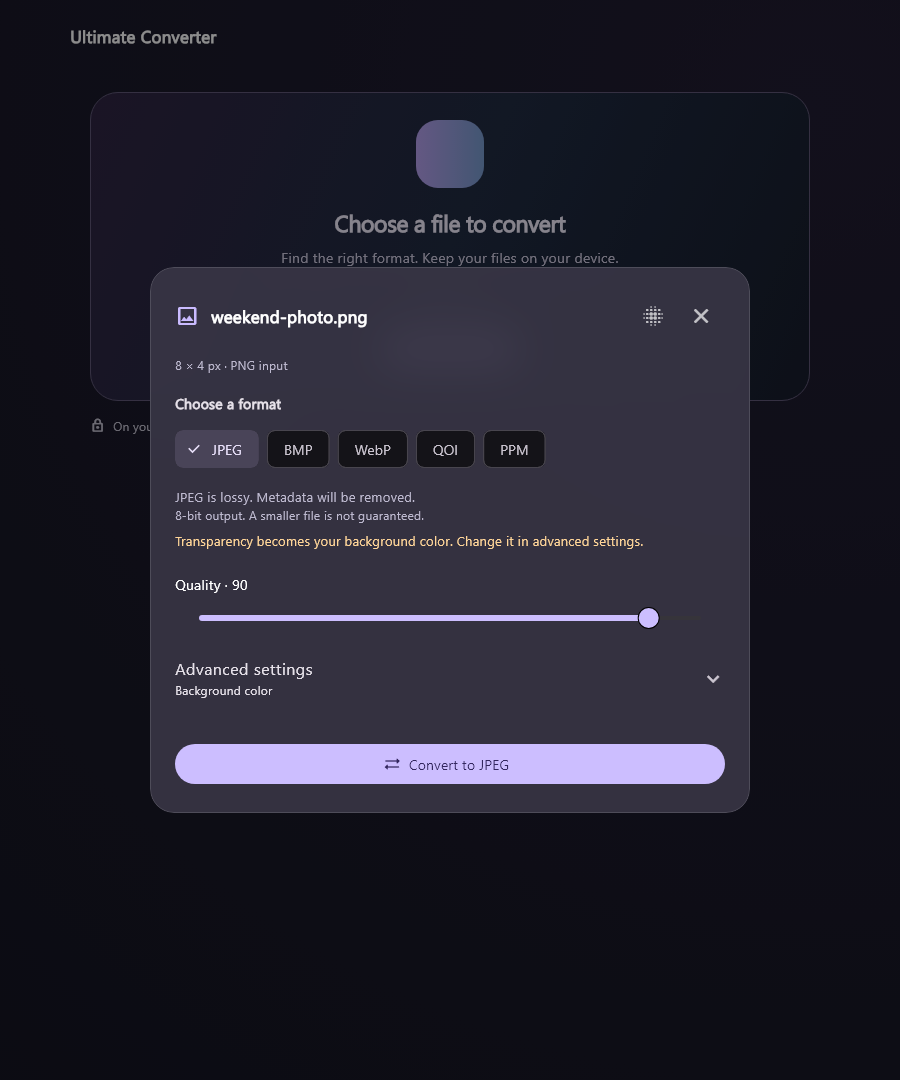
Switch between everyday still-image formats. Choose JPEG quality or keep transparency in supported outputs.
PNG · JPEG · WebP · + more
 ultimateconverter
A different format. The same privacy.
Convert images, documents, audio, and video right on your computer.
Free · Windows 10/11 x64 · v0.1.0 Beta 5
Prefer a portable ZIP?
01 / LESS FORMAT FRICTION
From a photo for your next post to a document for your next project. One calm place to convert.
Switch between everyday still-image formats. Choose JPEG quality or keep transparency in supported outputs.
Move between document formats. Recover readable text, headings, and tables from PDFs where the layout allows.
Convert audio or video, keep supported HDR, or tone-map HDR to SDR. Resize and shrink supported videos up to 4K.
Format or minify JSON and XML. Convert with an explicit typed mapping, and export plain-text logs.
Available formats depend on your file and installed engines. The beta also supports selected camera RAW variants. Explore release details
KEEP YOUR FILES CLOSE
Your photos, documents, and recordings don’t need a round trip to someone else’s server. Ultimate Converter processes them on your device.
02 / A SMALLER TO-DO LIST
A simple flow up front.
The useful controls, right where you need them.
Drop it into the app or choose it from your computer. The app inspects what’s inside.
See the available outputs. Choose a format and adjust the supported settings.
Convert, choose where to save, and open your new file. Find it again in recent conversions.
A QUICK LOOK INSIDE
Meet Ultimate Converter in under a minute.
Yes. Every shipped conversion feature is free, with no account or paid subscription required. Following or supporting the project doesn’t unlock conversion features.
Yes. Conversion happens on your computer. The installer includes the conversion engines and runtime libraries. You need an internet connection to download the app or open external project links.
This release targets Windows 10 and 11 on x64 computers. macOS, Linux, Android, and iOS downloads aren’t available in this release. Broad hardware and clean-machine testing are still in progress.
The installer adds the app for your Windows account, a Start menu shortcut, and an uninstaller. No administrator access is required. For the portable version, extract the entire ZIP and run ultimate_converter.exe with its included files and folders alongside it.
The app and installer are unsigned, so Windows may display an unknown-publisher or reputation warning. The beta has been tested on the developer’s Windows machine; broader compatibility and accessibility checks are still pending. Use the official release and review its notes before installing.
Some conversions are lossy, and formats have different limits. Complex PDF layouts can change, and scanned PDFs have no OCR in this beta. Still-image conversions are limited to 32 MiB and 4 million pixels. Animated images, encrypted documents, and unsupported codecs or RAW variants may be rejected. HDR supports PQ/HLG and Dolby Vision profile 8 with an HDR10-compatible base layer. Re-encoding that base discards dynamic metadata with your consent; supported HEVC copying to MKV preserves it. Size goals may fail safely if they cannot be met. Full-length 50 GB stress tests and HDR-screen fidelity checks remain pending. JSON/XML conversion uses the app’s typed mapping. Keep your originals and review important outputs.
NEW / WINDOWS BETA 5
Encode WebM AV1 on verified NVIDIA GPUs, including supported HDR and smaller-file settings. Choose CPU or GPU explicitly; incompatible settings are disabled. Tested on RTX 4060 Laptop. Availability depends on the accepted device, driver and app build.
New AVI output, offline archives, broader PDF and saved-HTML support, and bundled fallback fonts. Preparation avoids repeated full-source scans, and fresh successful video exports use shorter validation when timing checks agree.
Repair damaged audio with an explicit choice: replace short damaged sections with silence, up to five seconds total. Your original stays untouched. Severe damage can still prevent conversion.
Recovery, resource limits, safer cancellation cleanup and saved-file history remain included. Interrupted encoding restarts from the beginning. Every conversion feature is free; optional Base support includes a digital mini-guide.
Unsigned beta for Windows 10/11 x64. Broad hardware and full-movie stress tests remain pending. Read the full release notes and validation details
A LITTLE UTILITY. A LOT LESS FRICTION.
All the conversion features. All on your device. All free.
Download for WindowsWindows 10/11 x64 · v0.1.0 Beta 5 · Unsigned installer
PRACTICAL GUIDES
Choose a more widely playable video container without uploading your recording.
Use resolution, quality and size controls while keeping supported HDR information.
Create a readable document from a local HTML file without uploading it.
Extract editable document content from supported text-based PDFs.
OPTIONAL / SUPPORT DEVELOPMENT
Support Ultimate Converter through Base by mono and receive a Ukrainian mini-guide about formats, smaller files, HDR and checking your results.
One-time paid message from UAH 10. The digital guide is delivered after payment. This purchase does not unlock app features, priority or personal technical support.
Checkout opens on Base / monobank. No payment account is needed to use the converter.